

- It is Saturday morning and you have three weddings booked — all needing white folding chairs — you own 200. Wedding A needs 120, Wedding B needs 80, and Wedding C needs 60. On paper, the math does not work. But Wedding A is a morning ceremony that wraps by 1 PM, and Wedding C does not start until 5 PM. So theoretically, you can pick up from A and deliver to C in time. Theoretically.
- This is the reality of event rental inventory management — and it is where most party rental operators either thrive or bleed money. The businesses that handle overlapping bookings well grow fast. The ones that rely on memory, text threads, and spreadsheets eventually double-book something important and lose a client for good.
- This guide covers practical methods to manage your rental inventory — when your busiest days have three, four, or five events running simultaneously.

Why overlapping events break your inventory tracking
Event rentals are fundamentally different from other rental categories. A bike rental shop rents one bike to one person. An event rental business rents 150 chairs, 20 tables, 30 linens, a tent, and a dance floor — all to one client, all for one date. Multiply that by four or five weekend events, and you are tracking hundreds of individual items across multiple locations on the same day.
The challenge is not just knowing how many chairs you own. It is knowing how many are available right now — factoring in:
- What is currently out on delivery
- What is being cleaned or repaired
- What came back damaged from last night’s event
- What is already committed for tomorrow
Spreadsheets fall apart here. Missing a single inventory update can result in showing up to an event without the right equipment — or double-booking your most popular items. One missed cell, one forgotten edit, and a client is staring at an empty venue where their chairs should be.
The problem scales with your success. The more events you book, the more inventory conflicts you create — unless your tracking system can keep up.
The real cost of double-booking event rentals
An event rental double booking is not a minor inconvenience. It is a revenue and reputation emergency.
When you accidentally promise the same 80 chairs to two Saturday events, your options are all bad:
- Emergency sub-rental — you call another rental company and pay retail rates to cover the gap. That eats your entire margin on the booking — and then some.
- Downgrade the client — you show up with mismatched chairs or fewer than promised. The client is furious. The photos look terrible. You will never hear from that planner again.
- Cancel one booking — you lose the revenue, pay potential penalties, and leave a client scrambling days before their event.
The global party supply rental market hit $18.65 billion in 2025 and is projected to reach $21.45 billion in 2026. Demand is growing. The businesses that capture that growth are the ones with systems that prevent inventory errors before they happen — not the ones spending Saturday mornings making panicked phone calls.

Ready to stop double-booking your event inventory?
Try LendControl free for 14 days
No credit card required.
Track your party rental inventory with a system that updates in real time
The single biggest upgrade you can make to your party rental inventory process is moving from static records to a system that reflects availability the moment a booking is confirmed.
Here is what real-time tracking actually means in practice:
- Instant availability deduction — when a client books 120 white chairs for Saturday, those 120 are immediately removed from available stock for that date. No manual entry. No hoping someone updated the spreadsheet.
- Conflict detection — if another client tries to book 100 white chairs for the same Saturday, the system flags the conflict before you confirm. You can offer an alternative date, a different chair style, or waitlist them in case of cancellation.
- Return-to-available automation — when items are checked back in after an event, they re-enter the available pool automatically. No lag between the truck returning to the warehouse and those chairs being bookable again.
Centralizing all inventory data in one system significantly minimizes overbooking risk because you can monitor item availability across every upcoming event from a single view.
This matters most for high-volume items — chairs, tables, linens, glassware — where you might have 200-500 units that flow in and out of your warehouse multiple times per week. Tracking individual high-value items (tents, staging, dance floors) is easier. Tracking 300 identical white chairs across five concurrent events is where businesses get burned.
Build buffer time between bookings for cleaning and prep
You cannot rent a set of chairs at a Saturday morning brunch, pick them up at 2 PM, and promise them to a 4 PM wedding across town. Not if you want them clean, inspected, and presentable.
Every item in your inventory needs a buffer window between bookings — time for your crew to:
- Transport items back to your warehouse or directly to the next site
- Inspect for damage (broken chair legs, stained linens, cracked glassware)
- Clean and sanitize — predefined return workflows ensure every item is checked and cleaned before it goes out again
- Repair or replace anything that cannot go out in current condition
- Stage and load for the next delivery
A realistic buffer for most event rental operations:
- Standard items (chairs, tables) — 4-6 hours
- Linens requiring laundering — 12-24 hours
- Tents and staging needing breakdown and reassembly — a full day
The best event rental software lets you configure buffer times per item category. Set it once, and the system automatically blocks those windows when calculating availability.
Without buffer time built into your booking system, you will eventually promise a delivery you physically cannot make — and that is a client relationship you will not recover.
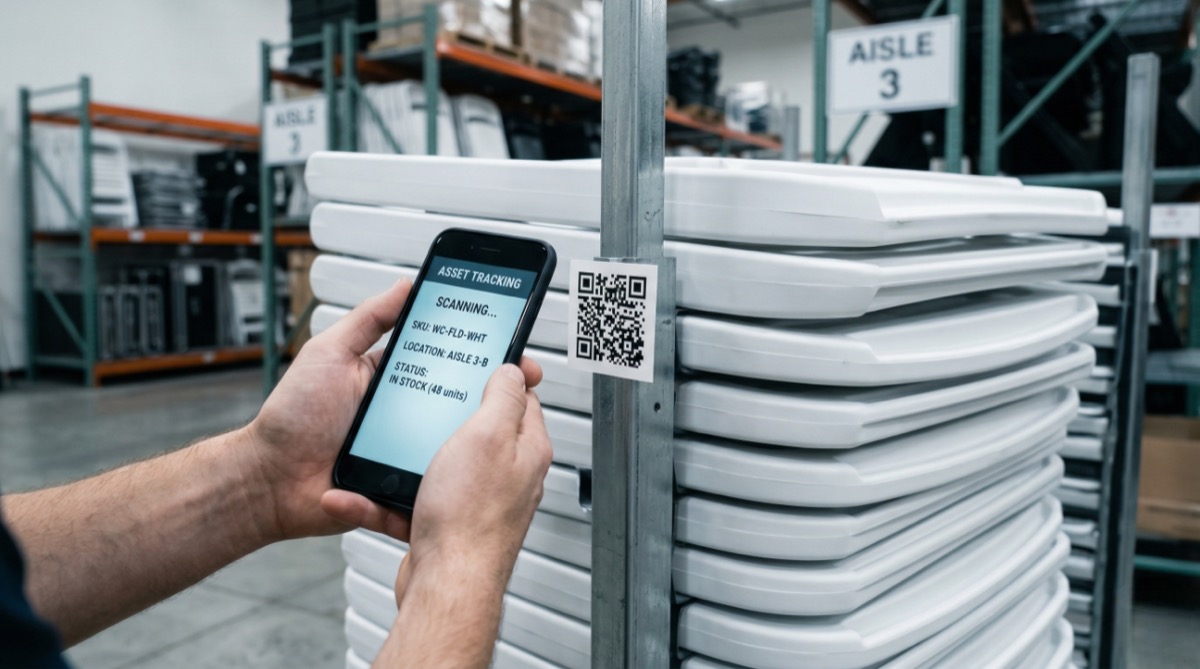
Use QR codes or barcodes to track what goes where
When you are running five events on a Saturday, knowing that “80 chairs went out this morning” is not enough. You need to know which 80 chairs, which truck they are on, and which event they are assigned to.
QR codes and barcodes solve this. QR codes can hold thousands of characters of tracking data — item descriptions, serial numbers, maintenance history — and any smartphone can scan them.
Here is how event rental operators use scanning in practice:
- Warehouse checkout — crew scans each item as it loads onto the delivery truck. The system logs which items are going to which event.
- On-site delivery — items are scanned at the venue to confirm delivery. The client’s order is marked as fulfilled.
- Post-event pickup — items are scanned back in. Damaged items get flagged immediately for repair.
- Return processing — scanned items re-enter available inventory once they pass inspection.
For a party rental inventory of 500+ items, this level of tracking eliminates the guessing that causes shortages and ghost inventory — items your system says are available but are actually sitting damaged in a corner of the warehouse.
You do not need expensive hardware either. Smartphones handle QR scanning effectively for field-based rental operations without requiring dedicated scanning equipment.
Pick event rental software that prevents conflicts automatically
Manual systems — spreadsheets, whiteboards, paper pull sheets — can work when you are doing two or three events a week. Once you hit five or more concurrent bookings on a weekend, you need software that handles conflict detection automatically.
Here is what matters most for an event rental business running multiple bookings:
- Calendar-based inventory view — see every committed item across every upcoming event on one screen. If Saturday is overcommitted on round tables, you know before the client calls.
- Automatic conflict alerts — the system should block or warn you before confirming a booking that exceeds available stock for that date.
- Buffer time settings — configure prep and turnaround windows per item category so the system accounts for cleaning and transit time, not just raw item counts.
- Multi-event daily view — on a five-event Saturday, you need a view that shows which items are going where, what time each delivery and pickup is scheduled, and where the gaps are.
One feature that is particularly useful for busy event rental operations: WhatsApp AI availability — when a client or event planner messages you with “Do you have 150 white chairs available for June 14th?”, they get an instant answer pulled from your live inventory. No forms, no waiting for a callback, no checking a spreadsheet before responding. For event rental operators fielding dozens of availability questions per week, that alone saves hours.
Built for multi-booking weekends.
No credit card required.
Frequently asked questions
How do I prevent double-booking event rental inventory?
Use a system that deducts items from available stock the moment a booking is confirmed — not when you remember to update a spreadsheet. Real-time inventory management with automatic conflict detection is the most reliable way to prevent double bookings. Pair it with buffer times between bookings so you are not promising items that have not been cleaned or returned yet.
What is the best way to track party rental inventory?
For small operations (under 100 items), a well-maintained spreadsheet with daily updates can work. Once you pass 100 items or handle more than three concurrent events, switch to dedicated rental management software with real-time tracking and QR code or barcode scanning. The combination of software-based availability tracking and physical scanning at checkout and return gives you the most accurate picture of where your inventory is at any moment.
How much buffer time should I leave between event rentals?
Plan for 4-6 hours minimum between bookings for standard items like chairs and tables. Linens that require laundering need 12-24 hours. Tents and staging that require breakdown and reassembly need a full day. Build these buffers into your booking software so the system automatically accounts for prep time when showing available dates.
Can I manage event rental inventory with spreadsheets?
You can — up to a point. Spreadsheets work for businesses with a small inventory doing one or two events per week. But they become error-prone and time-consuming once you scale past that. Businesses relying on spreadsheets lose an estimated $2,000-$3,000 per month in admin time, slow lead responses, and missed bookings. The transition to purpose-built software typically pays for itself within the first month.
What features should I look for in event rental software?
Prioritize: real-time inventory tracking with conflict detection, calendar-based availability views, configurable buffer times between bookings, QR or barcode scanning, online booking with automatic stock deduction, and customer communication tools. If your clients reach you through WhatsApp or messaging apps, look for a platform that can respond to availability questions automatically from your live inventory data.
Keep your busiest weekends profitable, not chaotic
Strong event rental inventory management is the difference between a five-event Saturday that runs smoothly and one that ends with emergency sub-rentals and angry clients. The fundamentals are straightforward:
- Track inventory in real time
- Build buffer time into your schedule
- Scan items in and out so nothing goes missing
- Use software that catches conflicts before you confirm a booking
Your event rental business grows when you can confidently say yes to more bookings — not when you are turning down events because you are not sure what is actually available. Get your inventory tracking right, and the revenue follows.
Ready to manage your event rental inventory from one dashboard?
No credit card required.